Hooked on Hooks: Building Cleaner, Reusable React Logic by Sahil Khan on September 11, 2026 244 views

If you’ve been coding in React for a while, you’ve probably typed out useState or useEffect more times than you care to admit. It’s second nature at this point. But after a while, you might notice yourself copy-pasting the same little chunks of logic from one component to another.
That’s where custom hooks come in.
When React introduced hooks back in version 16.8, it felt like a secret weapon. Suddenly, we didn’t need class components just to manage state or deal with lifecycle methods. useState and useEffect quickly became essential in every React app.
But here’s the part that doesn’t get talked about enough: the real magic of hooks isn’t the built-in ones—it’s the fact that you can roll your own.
Custom hooks let you pull out repetitive or complex stateful logic and wrap it up in a neat little function. The result? Components that are cleaner, easier to read, and way less of a headache to maintain.
And here’s the thing: like any tool, they can be a blessing or a curse. Use them well, and your codebase scales beautifully. Use them carelessly, and you’ve just added another layer of “harder to follow and debug”.
🔄 Quick Refresher: The Core Hooks You Need
React comes with a complete set of hooks — from state management to performance optimization.
But for this article, let’s keep it focused. Here are the three most commonly used hooks:
- useState: Local state in functional components
const [query, setQuery] = useState("");
- useEffect: Side effects after render (data fetching, DOM updates, timers, etc.)
useEffect(() => {
  if(query.length > 3){
	  handleSearchQuery(query);
  }
}, [query]);
- useContext: Share state, configuration, or even function without prop drilling
const { handleClick } = useContext(ToastContext);
And here’s the fun part: you’re not limited to using these hooks individually — you can combine them to craft your own custom hooks.
🎣 What Exactly is a Custom Hook?
At its core, a custom hook is simply a function that starts with use, and inside, you call other hooks—like useState, useEffect, or even other custom hooks. That’s it—nothing fancy, just React’s way of reusing logic.
But what makes it powerful is how it lets you extract and reuse stateful logic—without sharing the actual state across components. Every time you invoke a custom hook, React handles it like any other hook: it gives you a brand-new set of internal state and effects. Each call creates its own isolated state and effects.
📝 Note: The name of your hook must start with use. This isn’t just a naming convention—it’s how React knows to apply the Rules of Hooks. If a function doesn’t start with use, React’s linter won’t check for proper usage (like calling hooks only at the top level), and you might run into bugs that are hard to trace.
📌 When Should You Create a Custom Hook?
Let’s imagine you’re building a feature and suddenly notice the same piece of logic showing up in two or more components.
You’re repeating a useState or useEffect pattern, maybe fetching data in both places or handling form inputs identically. If you notice yourself thinking, ‘Hmm, this feels familiar…’, that’s a strong clue.
That right there is a big clue. Custom Hooks exist exactly for this situation – sharing stateful logic without sharing state itself.
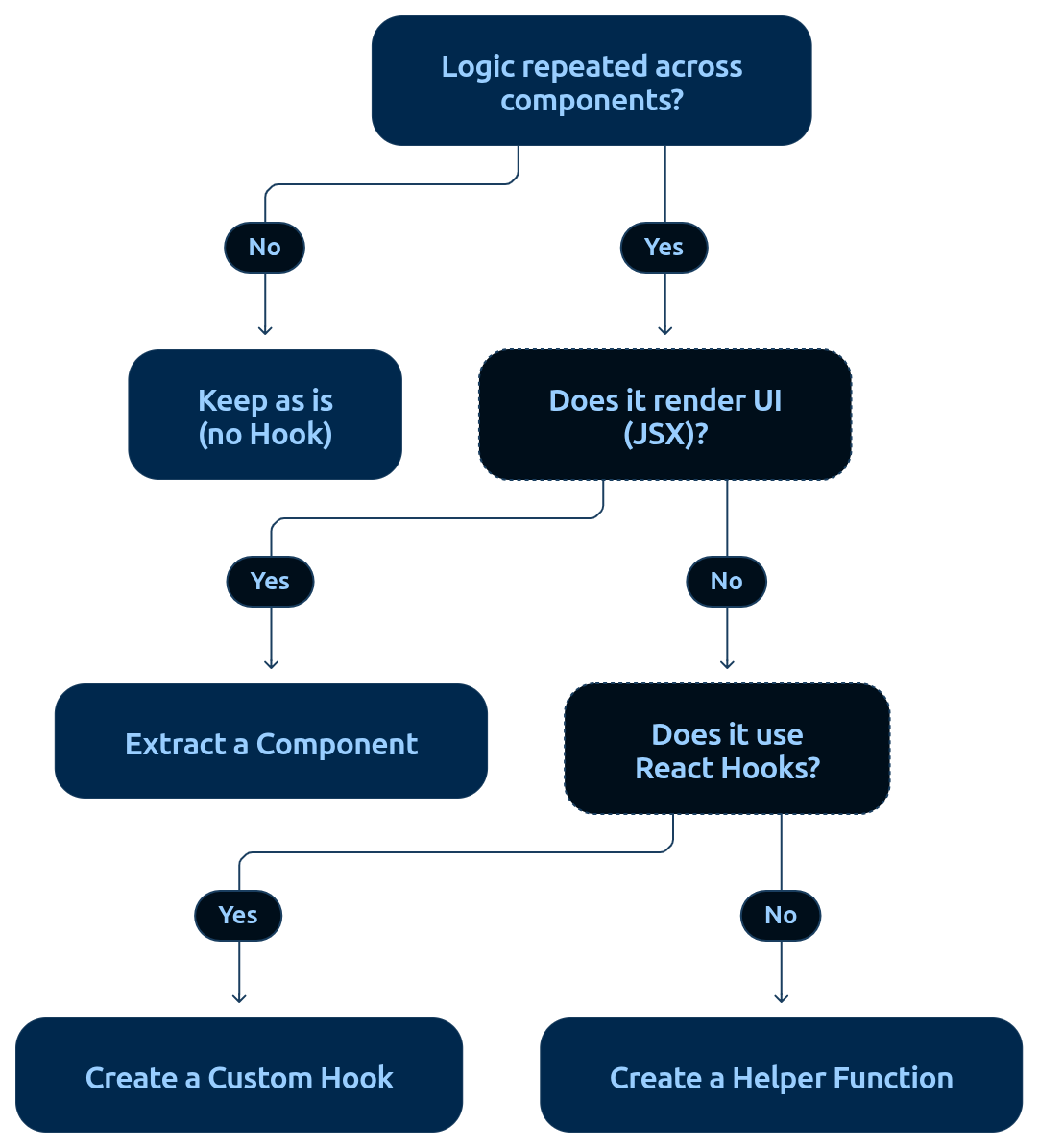
Questions to ask before creating a custom hook:
- “Am I duplicating logic?” – If you’re copying and pasting hook code across multiple components, that’s a strong signal. Pulling that logic into a hook keeps things DRY and saves you from fixing bugs in three different places later.
- “Is this logic purely functional, not rendering UI?” – A custom hook should be just logic. If the code you want to extract includes JSX or describes UI, you probably need a new component instead.
- “Does the extracted code already call other Hooks?” – If yes (e.g. it uses useState, useEffect, useContext, etc.), it’s a great candidate for a custom hook. If it doesn’t use any hooks, a plain utility function might be all you need.
- “Am I handling side effects?” – Whenever you find an effect (useEffect) or complex state logic, pause and consider: could this live in a Hook? Moving such effects in a custom hook can make the intent clearer and keep components tidy.
So in short: reach for a custom hook when you’ve got reusable, stateful logic that doesn’t render UI. That’s where they really shine.
But — and this is important — don’t jump too quickly. A little duplication is okay. If the logic is small or only appears once, keep it inline. It’s always better to avoid abstracting too early.
🤯 The “Bloated Component” Problem
Let’s take a user list with pagination example.
Without extracting logic, the fetching + pagination code gets mixed inside the component. Whenever you need pagination elsewhere, you’d have to duplicate the same effect and state management.
A naïve component might look like this:
const UsersList = () => {
  const [data, setData] = useState([]);
  const [page, setPage] = useState(1);
  const pageSize = 10;

  useEffect(() => {
    const fetchData = async () => {
      try {
        const response = await axios.get("/api/users", {
          params: { _page: page, _limit: pageSize },
        });
        setData(response.data);
      } catch (err) {
        console.error("Fetch failed:", err);
      }
    };
    fetchData();
  }, [page, pageSize]);

  return (
    <div>
      {/* user list rendering code */}

      <button onClick={() => setPage((p) => Math.max(p - 1, 1))}>Prev</button>
      <button onClick={() => setPage((p) => p + 1)}>Next</button>
    </div>
  );
};
export default UsersList;
✅ This works fine.
❌ But all the fetching + pagination logic is tied to this one component.
🛠 Refactoring with a usePaginatedFetch Hook
Let’s extract the pagination logic into a custom hook:
// ⚡ Tip: Keep the hook generic enough to reuse for any paginated endpoint
export const usePaginatedFetch = (url, { pageSize = 10 } = {}) => {
  const [data, setData] = useState([]);
  const [page, setPage] = useState(1);

  useEffect(() => {
    const fetchData = async () => {
      try {
        const response = await axios.get(url, {
          params: { _page: page, _limit: pageSize },
        });
        setData(response.data);
      } catch (err) {
        console.error("Fetch failed:", err);
      }
    };
    fetchData();
  }, [url, page, pageSize]);

  return {
    data,
    page,
    nextPage: () => setPage((p) => p + 1),
    prevPage: () => setPage((p) => Math.max(p - 1, 1)),
    goToPage: (p) => setPage(Math.max(1, p)),
  };
};
Now, the component looks way cleaner:
const UsersList = () => {
  const { data, page, nextPage, prevPage } = usePaginatedFetch("/api/users");
  return (
    <div>
      {/* user list rendering code */}

      <button onClick={prevPage}>Prev</button>
      <button onClick={nextPage}>Next</button>
    </div>
  );
};
export default UsersList;
✅ Benefits
- The component is now focused on UI and rendering.
- The fetching + pagination logic is tucked away in usePaginatedFetch.
- And best of all — you can reuse the hook anywhere:
- Paginated Users list
- Paginated Products list
- Paginated Orders list
const { data, page, nextPage, prevPage } = usePaginatedFetch(url);
Custom hooks don’t have to stand alone—you can compose hooks by calling one hook inside another. This is called hook composition, and it’s a powerful way to build more complex, reusable logic without repeating code.
⚖️ Pros & Cons of Custom Hooks
✅ Pros
- Reusability: Write logic once and share across components.
- Clarity: Components stay focused on UI, while hooks handle logic.
- Maintainability: Fix a bug in a hook → fixed everywhere.
- Testability: Hooks are plain functions, easy to test in isolation.
- Encapsulation: Side effects and stateful logic are neatly contained, keeping components simpler.
⚠️ Cons
- Over-abstraction : Abstract only when logic is complex enough.
- Naming matters : A poorly named hook may indicate it’s doing too much or is unclear to other developers.
- Hidden complexity : Logic inside hooks can make debugging harder if the abstractions aren’t clear.
🚀 Final Thoughts
Custom hooks aren’t just code—they’re your craft. React gives you raw materials with useState, useEffect, and friends. But the real magic begins when you shape those into tools built for your world: a useDebounce that tames noisy inputs, a useAuth that guards your routes, or a useFetchPagination that keeps data flowing smoothly.
Every time you spot repeated logic, you’re at a crossroads. You can copy-paste and move on, or you can pause and ask: Is this a hook waiting to be born? Choose the latter if required , and you’re not just saving lines of code—you’re building a codebase that’s cleaner, scalable, and a joy to work with.
About Author
