Anatomy of a Cookie Heist — Reverse Engineering an Info-Stealer by Pratik Dabhi on April 8, 2026 4 views

What looked like a simple setup.exe turned out to be a stealthy info-stealer that stole Microsoft 365 session tokens from Chrome cookies — completely bypassing MFA. Here’s the full forensic breakdown.
Introduction
Suspicious login activity was observed from multiple geographic regions, inconsistent with known user behavior.
Earlier this month, our team investigated a real-world malware incident involving the theft of Microsoft 365 session tokens via Chrome cookies. What initially appeared to be a harmless setup executable turned out to be a stealthy info-stealer equipped with anti-debugging, obfuscation, and exfiltration capabilities.
This writing walks you through the forensic and reverse engineering process that uncovered the malicious payload, how it stole Microsoft session data, and why polymorphic delivery made it difficult to detect.
Incident Background
The investigation was triggered by an unusual spike in Azure billing, which showed excessive compute charges within a single day. Further investigation revealed that a significant amount of computing power had been used at full capacity for several hours — a pattern commonly associated with unauthorized cryptocurrency mining activity.
Suspicious login activity was observed from unusual locations, including instances of impossible travel within short timeframes. As a containment measure, the Azure account was immediately disabled. This incident prompted a full forensic investigation of the suspected user endpoint.
During the investigation:
- The user had administrative privileges on a Windows 10 machine. This elevated access likely allowed the malware to retrieve browser tokens and maintain persistence without being blocked.
- Chrome browser history revealed the victim had accessed a malicious website disguised as a software repository.
- Instead of receiving the expected utility, a file named
setup.exewas downloaded and executed.
The file came from a polymorphic URL — every download produced an executable with a different hash, complicating detection and reputation-based blocking. None of the hashes we captured were present on VirusTotal at the time of analysis.
This chain of events led to the discovery of an info-stealer malware that exfiltrated browser session cookies, including tokens associated with Microsoft 365 authentication.
Malware Dissection: setup.exe
Using CAPA, FLOSS and other tools, we confirmed the binary’s behavior matched a classic credential-stealing infostealer, with multiple layers of stealth and evasion.
Key Capabilities
| Behavior | Evidence | ATT&CK Technique |
|---|---|---|
| Anti-Debugging/Sandbox Evasion | INT3 breakpoints, TLS callbacks, Xen check | T1497.001 |
| Obfuscation | Stack strings, Base64, XOR (63 matches) | T1027, T1027.005 |
| Credential Theft | Chrome file access + CryptUnprotectData | T1555.003 |
| File Timestomping | Uses SetFileTime to hide file modification | T1070.006 |
| Exfiltration | HTTPS C2 with encoded payloads | T1041, T1071.001 |
| Credit Card Validation | Luhn algorithm present | C0032.002 |
Additional artifacts:
- No GUI (silent execution)
- RC4, XOR, and Base64 encoding are used to obfuscate network payloads
- Used
ShellExecuteExto spawn additional tools or commands
Forensic & Behavioral Analysis
Chrome Artifact Inspection
- The
HistoryandDownloadsSQLite databases confirmed that the user had accessed a rogue software site, consistent with the timeline of the Azure abuse. - The Chrome
CookiesSQLite database revealed stored session tokens for:login.microsoftonline.comESTSAUTHPERSISTENT— a persistent Microsoft 365/Azure Entra ID session token that enables seamless reauthentication.
What is ESTSAUTHPERSISTENT?
The ESTSAUTHPERSISTENT cookie is a persistent version of the Azure Entra ID session token. It is set when a user selects “Stay signed in?”, or when organizational policies enforce KMSI (Keep Me Signed In). Once set, this cookie remains valid across browser restarts and often for as long as 90 days, unless revoked or invalidated by policy changes, password resets, or session termination.
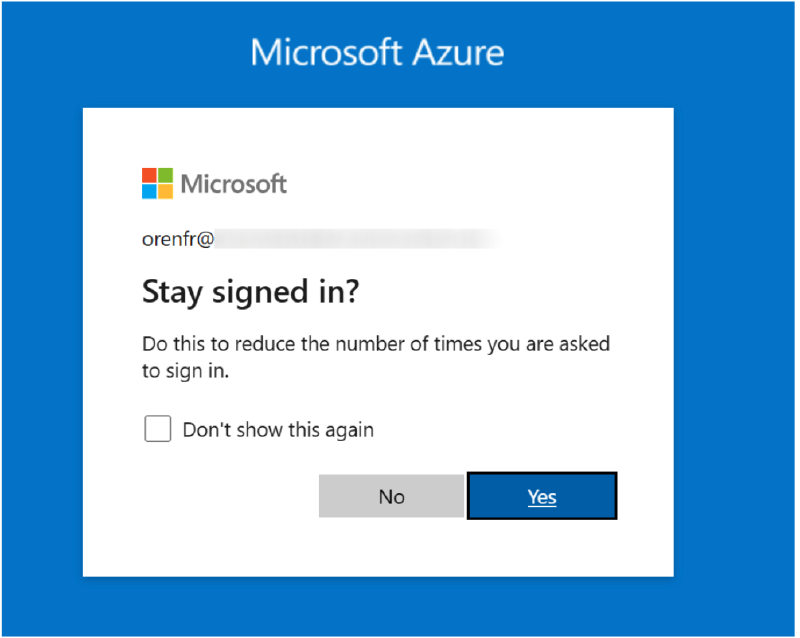
Microsoft Azure’s Stay Signed In Prompt. Image Source: Varonis’s Cookie Bite report
This cookie acts as a high-privilege session credential that tells Azure Entra ID:
“This user already authenticated (including MFA), so do not prompt again.”
If an attacker exfiltrates this cookie, they can fully impersonate the user without needing the password or triggering MFA — effectively bypassing all login barriers. This behavior aligns with the detailed breakdown in Varonis’s Cookie Bite report, which warns that ESTSAUTHPERSISTENT tokens are “keys to the kingdom.”
Why “Stay Signed In” is Risk
The “Stay signed in?” prompt significantly increases convenience, but greatly reduces session security.
- These tokens persist beyond logout or browser closure
- They are vulnerable to local theft via malware (as seen in this case)
- Once stolen, they allow MFA bypass and persistent access for weeks or months
- Traditional log correlation and alerts may fail to detect misuse if replayed from similar browser environments
Best Practice: Unless organizational policy enforces secure handling and endpoint hardening, users should avoid selecting “Stay signed in,” especially on unmanaged or personal devices.
Memory & Disk Forensics
- Procmon logs captured
setup.exeaccessing the Chrome cookie storage file:C:\Users\<User>\AppData\Local\Google\Chrome\User Data\Default\Cookies - Wireshark logs revealed outbound HTTPS communication occurring within seconds of the cookie access, strongly indicating a real-time exfiltration attempt.
- While we confirmed the use of encoding techniques such as Base64 and XOR within the binary, these obfuscation layers have thus far prevented conclusive identification of the Command-and-Control (C2) server or the exact destination URLs/IPs involved in data exfiltration.
- Although a handful of external IP addresses have been identified in the traffic logs, additional investigation and correlation are still in progress to confirm their role in the attack.
Despite these unresolved questions, the evidence from decrypted cookies, session replay, and matching behavioral traces clearly confirms the exfiltration and reuse of the victim’s Microsoft 365 session cookie.
Cookie Theft In Action
The malware leveraged the Windows API function CryptUnprotectData to decrypt Chrome’s encrypted cookie jar. Among the cookies accessed was the critical: ESTSAUTHPERSISTENT
This cookie is a persistent Azure Entra ID (formerly AAD) session token that effectively acts as a long-lived authentication credential. Once obtained, it bypasses password prompts and Multi-Factor Authentication (MFA), which grants malicious actors access to the Azure Portal, without alerting the user or triggering additional login challenges.
For an excellent breakdown of how this token works and why it’s dangerous, see Varonis’s article: Cookie Bite.
How Was the Cookie Decrypted?
Step 1: Locate Cookie Database
Chrome stores session cookies in an encrypted SQLite database located at:
C:\Users\<User>\AppData\Local\Google\Chrome\User Data\Default\Cookies
Step 2: Extract the Encryption Key
The AES encryption key is stored in a Local State JSON file under the user’s Chrome profile.
Step 3: Decrypt via DPAPI
The key is protected using Windows DPAPI.
Malware running within the same user session can decrypt it without requiring elevated privileges.
Step 4: Decrypt Cookies
With the key obtained, the malware decrypts cookie values (typically AES-GCM) from the SQLite database.
In short: No special privileges are needed — just local access to the victim’s session, which the malware already has.
Confirming the Theft
From the original forensic image of the victim machine, we created a fresh cloned working copy in a controlled analysis environment to prevent contamination or tampering. This replica allowed us to operate in a safe sandboxed state while preserving forensic integrity.
After identifying the presence of the ESTSAUTHPERSISTENT token in Chrome’s cookie store, we disabled the affected user’s Azure account to ensure no further unauthorized access could occur during analysis.
Once containment was in place, we proceeded to:
- Extract the
ESTSAUTHPERSISTENTcookie value for thelogin.microsoftonline.comdomain from Chrome. - Replay the token in a fresh browser session on the cloned image, simulating what an attacker would do with exfiltrated credentials.
This test resulted in a successful reauthentication to the Microsoft 365 and Azure portals without requiring a password or triggering MFA. The token established a valid user session, and the session identifiers and access patterns matched those seen during the attack window, confirming that the token was indeed exfiltrated and reused by the attacker. This exercise provided definitive proof that the malware obtained and exfiltrated an active authentication token, allowing it to bypass all login protections and operate within the victim’s cloud environment undetected.
Why Detection Failed
| Challenge | Why It Mattered |
|---|---|
| Polymorphic Delivery | Each download generated a unique setup.exe with different hashes |
| No AV Signatures | None of the samples were flagged on VirusTotal at the time of the attack |
| Stealth Design | Anti-debugging, timestamp tampering, no GUI, and minimal disk I/O |
Preventive Actions
To avoid the recurrence of similar incidents, we suggested proactively implementing the following measures:
Azure Monitoring and Alerts
- Configured billing threshold alerts to detect sudden spikes in resource usage
- Set up anomaly detection for sign-ins from outside authorized geographic regions
- Alerts for repeated failed logins and risky user behavior via Microsoft’s security risk model
Azure AD Hardening
- Conducted a full audit of Azure Active Directory user roles
- Restricted administrative write permissions to only necessary accounts following the principle of least privilege
- Recommended upgrading to the Azure AD Premium P2 license to enforce Conditional Access, Identity Protection, and advanced security controls
Organization-Wide Security Hardening
Endpoint Hardening
OS Hardening Across Endpoints
- Implementing OpenSCAP/SCAP benchmark policies for compliance and configuration baseline enforcement
- Continuous audit and validation using automated scans on employee workstations
Monitoring & Detection
Security Monitoring and Detection
- Deploying Wazuh/SIEM across critical systems for host-based intrusion detection and audit log monitoring
- Deploying Next-Gen Firewalls with IPS/IDS, application control, and outbound C2 traffic inspection
- Deploying endpoint security applications and establishing a security program
Awareness & Governance
Security Awareness and Governance
- Launching a formal Cybersecurity Training Program for all employees to raise awareness around phishing, malware, and data handling best practices
- Drafting and enforcing internal security policies to comply with recognized information security standards (e.g., ISO 27001, CIS)
Final Thoughts
This case is a textbook example of how attackers are evolving from phishing to token-based session hijacking. By avoiding passwords altogether and stealing persistent tokens, they can operate without tripping traditional alarms.
Infostealers are getting stealthier — and defending against them requires a combination of:
- Endpoint monitoring — catch the cookie access before exfiltration
- Credential hygiene — avoid “Stay signed in” on unmanaged devices
- Awareness — cookies are just as valuable as passwords
Disclaimer: This case study is a fictionalized composite based on patterns observed across multiple security engagements. All client-identifying information, organization names, infrastructure details, and personally identifiable data have been redacted, anonymized, or fabricated. Any resemblance to specific organizations, individuals, or incidents is purely coincidental. Technical details have been generalized for educational purposes and do not represent any single client’s environment. This content is published in accordance with professional confidentiality obligations and non-disclosure agreements. Nothing in this article should be construed as attribution to any specific entity.
About Author
