“Why Is My API Crying?” — Meet Messaging Queues, the Unsung Heroes of Scalability by Sahil Khan on May 6, 2026 675 views
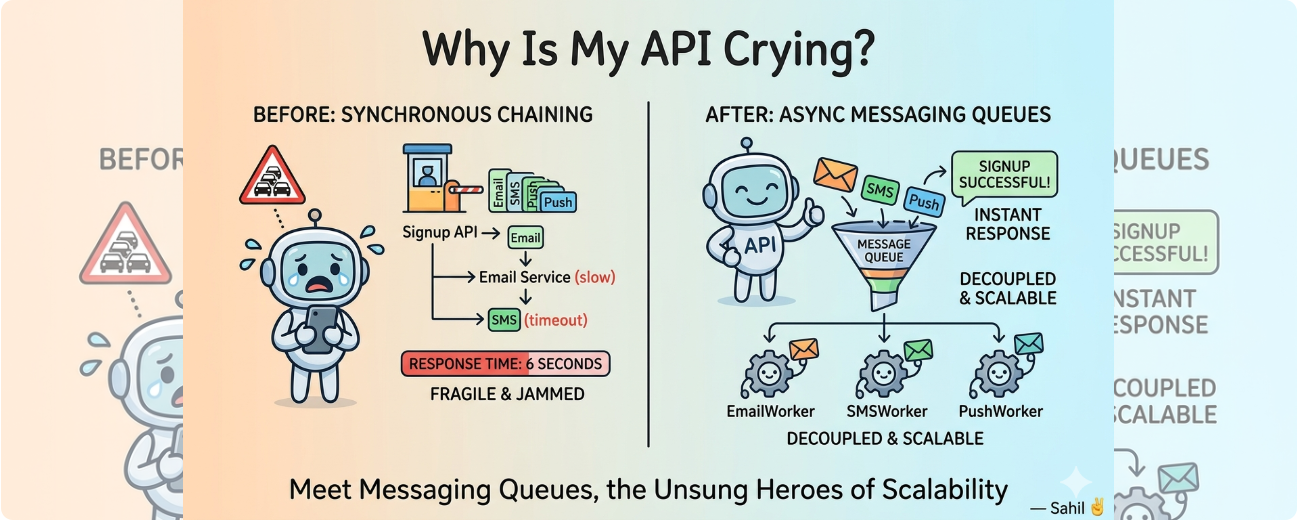
🚨 A Familiar Problem: The “Just One More Call” Spiral
You’ve built a user registration API. It works great.
Until your product manager says:
“When a user signs up, we should send them an email. Oh, and an SMS. Oh, and a push notification.”
You nod, smile, and write this:
public void notifyUser(User user) {
    sendEmail(user);
    sendSMS(user);
    sendPush(user);
}
It works… at first.
Then one day, the email service is slow, the SMS times out, and your signup API response time shoots up to 6 seconds.
Your API is now fragile and jammed up—like traffic at a single-lane toll booth during rush hour.
🎯 What’s the Root Issue?
Synchronous chaining is the root issue.
You’re doing everything sequentially, one after the other. Each call waits for the previous one to finish. If anything breaks or slows down, the entire chain is toast.
The consequences?
- API response time balloons.
- One slow service holds up everything.
- Users are left waiting.
- Scalability hits a wall.
🧹 The Clean-Up Crew: Messaging Queues
Imagine this flow instead:
- A user signs up.
- Your API enqueues three messages: one each for Email, SMS, and Push.
- API responds instantly: “Signup successful!”
- Background services (EmailWorker, SMSWorker, etc.) process their messages when ready.
Boom 💥—your system is now decoupled, and each service can work independently.
What is a Messaging Queue?
A messaging queue is like a shared to-do list where services drop tasks (messages) for others to pick up. It temporarily stores tasks until workers are ready to process them. Think of it as a buffer between “I need this done” and “I’ll do it when I’m ready.”
- Producer: The component that creates and publishes messages to the queue. In our case, your API acts as the producer, saying: “Hey, someone please send this email!”
- Message queue: The middleman or buffer that holds messages until a consumer is ready to process them.
- Consumer: The component that listens to the queue and processes tasks (like sending the actual email or SMS). Think of them as background workers constantly checking the to-do list.
You write the tasks, move on, and let the consumers handle them asynchronously.
🛠️ Before vs After
❌ Old Way: Block and Break
public void notifyUser(User user) {
    sendEmail(user);
    sendSMS(user);
    sendPush(user);
}
Problems:
- Everything must succeed for the API to finish.
- Errors bubble up quickly.
- No parallelism.
- No scalability. One user? Cool. A thousand users? Not so much.
✅ New Way: Queue and Chill
public void notifyUser(User user) {
    queue.publish(new Message("Email", user.getEmail()));
    queue.publish(new Message("SMS", user.getPhone()));
    queue.publish(new Message("Push", user.getDeviceId()));
}
Benefits:
- Instant API responses.
- Failures isolated.
- Services independently scalable.
- Cleaner, more resilient flow.
📦 How It Works (Plain Java Edition)
Below is a simplified Java-based example of how a messaging queue system works.
It simulates how producers (your API) send messages and consumers (worker threads) process them.
1. Define a Message
// A compact, immutable data class introduced in Java 14+
// Automatically provides constructor, getters, equals, hashCode, and toString
public record Message(String type, String payload) {}
Since it’s a record, the class is immutable and boilerplate-free—perfect for simple data transfer objects.
This is a simple message object. In production systems, messages might contain IDs, timestamps, or JSON payloads. But we’re keeping it minimal for clarity.
2. MessageQueue
// ✅ Thread-safe queue for message passing between producer and consumer.
// LinkedBlockingQueue blocks the consumer thread until a message is available.
import java.util.concurrent.BlockingQueue;
import java.util.concurrent.LinkedBlockingQueue;

public class MessageQueue {
    private final BlockingQueue<Message> queue = new LinkedBlockingQueue<>();

    public void publish(Message message) {
        queue.add(message);
    }

    public Message consume() throws InterruptedException {
        return queue.take(); // blocks until available
    }
}
This mimics how a real message broker (like RabbitMQ) buffers messages. In Java, BlockingQueue lets one thread produce and another consume without worrying about synchronization.
3. Producer
public class Producer {
    private final MessageQueue queue;

    public Producer(MessageQueue queue) {
        this.queue = queue;
    }
    public void notify(String type, String payload) {
        queue.publish(new Message(type, payload));
    }
}
4. Consumer
public class Consumer implements Runnable {
    private final MessageQueue queue;
    private final String consumerName;

    public Consumer(MessageQueue queue, String consumerName) {
        this.queue = queue;
        this.consumerName = consumerName;
    }

    public void run() {
        while (true) {
            try {
                // 1️⃣ Waits for a message (blocks until one is available)
                Message msg = queue.consume();
                // 2️⃣ Processes message based on its type
                switch (msg.type().toLowerCase()) {
                    case "email" -> sendEmail(msg.payload(), consumerName);
                    case "sms"   -> sendSMS(msg.payload(), consumerName);
                    case "push"  -> sendPush(msg.payload(), consumerName);
                    default -> System.out.println("Unknown: " + msg);
                }
            } catch (InterruptedException e) {
                // Gracefully exit if thread is interrupted
                Thread.currentThread().interrupt();
                break;
            }
        }
    }
    // service methods for sending Email, SMS and Push Notifications
    public void sendEmail(String message, String consumerName){
        System.out.println(consumerName + " sending Email: " + message);
    }
    public void sendSMS(String message, String consumerName){
        System.out.println(consumerName + " sending SMS: " + message);
    }
    public void sendPush(String message, String consumerName){
        System.out.println(consumerName + " sending Push notification: " + message);
    }
}
This loop keeps the consumer thread alive. In production, you’d probably use a thread pool or executor service to manage workers more robustly.
5. Main App
Interactive main method to simulate user input and message production. You type a message once, and the system automatically sends it as Email, SMS, and Push notification—simulating all three message types in one go. Behind the scenes, two consumers are running in parallel. The one that’s free first picks up the next message. This mimics parallel, asynchronous processing. Type exit to quit.
import java.util.Scanner;

public class Main {
    public static void main(String[] args) {
        MessageQueue messageQueue = new MessageQueue();
        Producer producer = new Producer(messageQueue);

        new Thread(new Consumer(messageQueue, "Consumer 1")).start();
        new Thread(new Consumer(messageQueue, "Consumer 2")).start();

        Scanner scanner = new Scanner(System.in);
        System.out.println("Enter the message to send:");
        while (true){
            String input  = scanner.nextLine();
            if(input.equalsIgnoreCase("exit")){
                System.out.println("Shutting down producer...");
                break;
            }
            producer.notify("email", input);
            producer.notify("sms", input);
            producer.notify("push", input);
        }
        scanner.close();
    }
}
🖨️ Sample Output
Enter the message to send:
Welcome to the platform!
Consumer 1 sending Email: Welcome to the platform!
Consumer 2 sending SMS: Welcome to the platform!
Consumer 1 sending Push notification: Welcome to the platform!
🖼️ Here’s a simple diagram showing the flow from API to Queue to Consumer Workers:
     [User]
        │
        ▼
+------------------+        Enqueue Tasks
|  Signup API      | ────────────────────────────┐
+------------------+                             │
        │                                        ▼
        ▼                          +------------------------+
 "Signup successful!"              |      Message Queue     |
 (Instant response)                | (Buffer holding tasks) |
                                   +------------------------+
                                             │
                  ┌──────────────────────────┼──────────────────────────┐
                  ▼                          ▼                          ▼
        +----------------+          +----------------+         +----------------+
        | (Consumer 1)   |          | (Consumer 2)   |         | (Consumer 3)   |
        +----------------+          +----------------+         +----------------+
                 │                          │                          │
		  sendEmail(user)             sendSMS(user)             sendPush(user)
🧱 Real-World Scalability Tips
🧨 Problem: Single point of failure
If the component that manages your queues fails, the entire flow can stop.
👉 The message broker acts as a middleman, accepting tasks from producers and holding them until consumers are ready.
💡 Fix: Use redundancy — deploy multiple instances and configure automatic failover so that message delivery continues even if one goes down.
🧨 Problem: Queue overload
When too many messages pile up in a single queue, it slows down processing or leads to dropped tasks.
💡 Fix: Use queue partitioning — break tasks into multiple queues based on type, priority, or region (e.g. separate queues for emails, SMS, and push notifications).
🧨 Problem: Slow consumers
If consumers can’t process messages fast enough, the queue grows and your system delays increase.
💡 Fix: Scale out horizontally — add more consumer instances or threads to process messages in parallel and reduce backlog.
🧠 The Takeaway
Messaging queues are a pattern, not a microservice-only tool.
Messaging queues are like giving your services their own todo lists. They take the pressure off your API, improve fault tolerance, and scale gracefully.
Instead of blocking your whole app for every little downstream task, you:
- Fire the message
- Forget (kind of)
- Let workers handle the chaos asynchronously
No more slow APIs. No more tangled logic. Just clean, decoupled services doing their jobs independently.
🤓 Dev Sign-Off
You don’t always need complex solutions — sometimes, all it takes is a message, a queue, and a bit of patience.
Decoupling isn’t just architecture theory — it’s cleaner code, smoother flows, and apps that don’t freeze under pressure.
Until next time, keep your services talking… just not all at once.
— Sahil ✌️
About Author
