Demystifying Apache Kafka: The Internal Architecture Driving Massive Event Streaming by Nitin Goyal on April 20, 2026 1,209 views
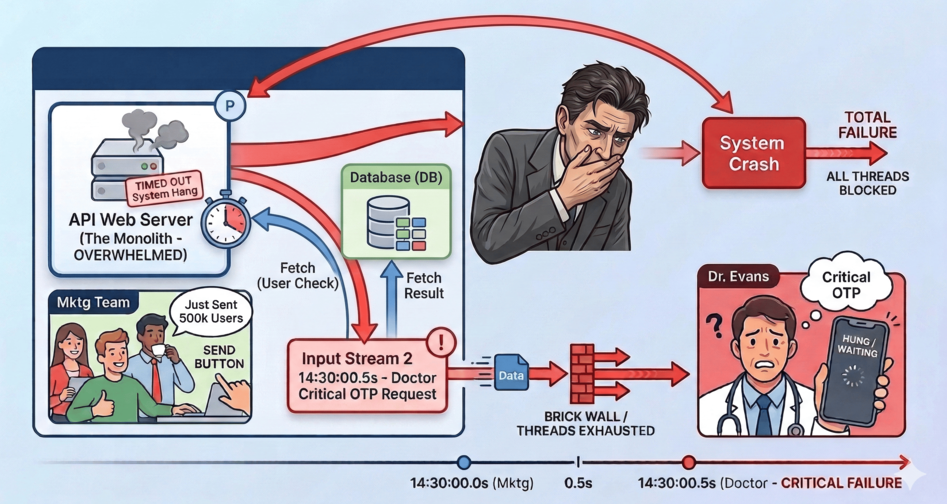
Imagine you’ve just built a thriving healthcare platform. Everything is humming along nicely until one fateful afternoon. A doctor requests a critical OTP to log into the portal. Exactly 0.5 seconds prior, your marketing team triumphantly clicked “Send” on a promotional SMS broadcast to 500,000 users.
In your monolithic server, a thread loops over the 500,000 users in the database. Think about the sheer weight of that transaction for a moment: fetching thousands of users from the DB, updating their pending statuses, and then synchronously calling an external SMS API over the internet one by one! That is an insane amount of heavy lifting for a single API request. Let’s say, each API call takes half a second, all your server threads instantly become occupied waiting for responses. The doctor’s OTP request hits a brick wall. The system hangs, times out, and crashes.
Welcome to the ultimate architectural bottleneck: Synchronous execution at scale.
To solve this, we don’t need a bigger server. We need an entirely different paradigm. We need an Event-Driven Architecture, powered by the undisputed king of message streaming: Apache Kafka.
But how does Kafka actually work under the hood? Let’s take a journey through Kafka’s internal infrastructure by fixing our broken SMS system step-by-step.
1. The Safety Net: Enter the Brokers
The first thing we need is a middleman — a heavily fortified safety net. Instead of our web server calling the slow SMS API directly, it will instantly generate an “Event” (e.g., Send this SMS to User X) and dump it into Kafka.
Kafka runs as a distributed cluster of servers. Each individual server in this cluster is called a Broker. A broker’s sole purpose is to receive these events, save them immutably to disk, and serve them to background worker applications (Consumers) whenever they are ready.
Because we decoupled the creation of the SMS from the sending of the SMS, our web server finishes its job in 2 milliseconds. The web server never crashes.
2. Paving the Highways: Topics
Simply dumping messages into our brokers creates a new problem: our critical OTP is still stuck in the exact same queue behind 500,000 promotional texts.
To fix this, Kafka allows us to categorize our data streams into Topics. Think of a Topic as a dedicated, named highway.
Instead of one giant bucket, we create two distinct Topics:
sms.priority(The Fast Lane – for OTPs and Alerts)sms.non_priority(The Slow Lane – for Marketing Broadcasts)
Now, we can write a dedicated “Fast Consumer” application that only listens to sms.priority. When an OTP arrives, it is processed instantly, completely oblivious to the massive traffic jam sitting over in the sms.non_priority topic.
3. Adding Lanes to the Highway: Partitions
Categorizing traffic is great, but what happens when sms.non_priority receives an absolutely crushing amount of data? A single Kafka Broker, no matter how powerful, has a hardware limit on network bandwidth and disk speed.
Kafka solves this by splitting a single Topic across multiple brokers using Partitions.
If we configure sms.non_priority to have 3 Partitions, Kafka physically splits the data into three separate append-only logs, often residing on three completely different brokers.
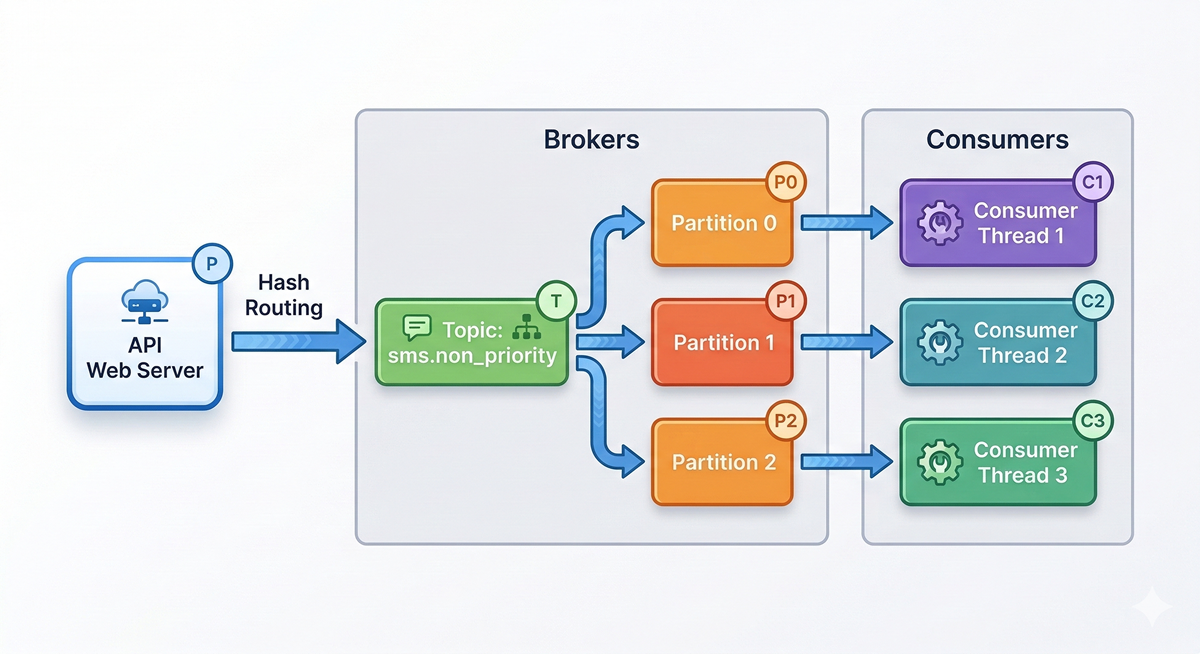
This is Kafka’s secret to infinite horizontal scaling. By having 3 partitions, we can boot up 3 completely independent Consumer threads. Kafka acts as a traffic cop, assigning exactly one partition to each thread. Our SMS processing throughput just tripled. Need to process 10x faster? Create 30 partitions and spin up 30 consumer threads.
4. Bookmarking Progress: Offsets
With thousands of messages flowing through these partitions simultaneously, how does a Consumer thread remember which SMS it just sent? If the Consumer application crashes and reboots, how do we guarantee it doesn’t accidentally re-send a promotional SMS to a user?
Every single event written to a Partition is assigned a sequential, immutable ID called an Offset (0, 1, 2, 3…).
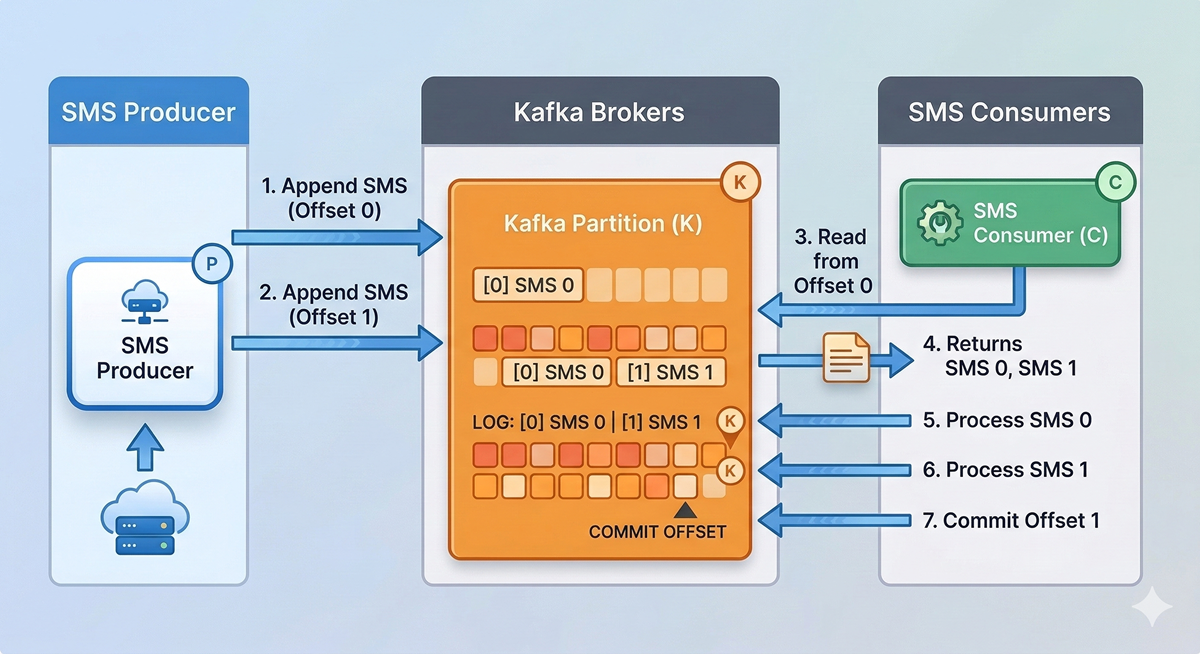
When our Consumer successfully physically sends the SMS, it sends a tiny message back to Kafka saying, “I have successfully completed up to Offset 1.” This is called committing an offset. If the Consumer crashes, a new thread takes its place, asks Kafka for the last committed offset, and flawlessly resumes processing starting exactly at Offset 2.
5. Surviving the Fire: Leaders and Followers
What happens if the specific physical Broker holding Partition 0 catches fire and dies? In a naive system, we just lost one-third of our un-sent SMS queue.
Kafka is designed for chaos. When you create a topic, you define a Replication Factor. If we set it to 3, Kafka ensures every single event is copied to three separate Brokers.
For every Partition, one Broker is elected as the Leader, and the others are Followers (Replicas). All reads and writes go straight to the Leader. The Followers silently copy the Leader’s log in real-time. If the Leader broker literally explodes, the Kafka cluster detects it in milliseconds, crowns a Follower as the new Leader, and your SMS Gateway continues streaming without dropping a single event.
The Low-Level Mechanics of Speed ⚡
We’ve covered the structural architecture. But how does Kafka physically process millions of messages a second without demanding mountains of RAM? Let’s dive below the abstraction layer.
The Illusion of Memory: OS Page Cache
Developers often assume Kafka must be an in-memory datastore (like Redis) because of its blinding speed. It isn’t. Kafka fundamentally stores everything on the physical hard disk.
But Kafka plays a brilliant trick on the Operating System. It relies heavily on the OS Page Cache. Instead of building a custom, heavy caching layer inside the Java Virtual Machine (JVM), Kafka just writes to the file system. Linux is incredibly smart; it realizes Kafka is utilizing these files heavily and intercepts the data, holding it in the server’s free RAM (the Page Cache) before lazily flushing it to disk.
When your Consumer asks for the newly arrived SMS, Kafka asks the file system, and Linux hands it back directly from RAM. No Java Garbage Collection pauses, and insane speed.
The Append-Only Native
Traditional relational databases try to be everything. When you UPDATE or DELETE a row, the database has to jump around the hard drive finding exactly where that fragment of data belongs. Hard drives are terrible at this (Random I/O).
Kafka is intentionally dumb. It is an Append-Only Log. When an event arrives, Kafka simply slaps the raw bytes at the very end of the file. It never updates. It never deletes. It just appends. This is called Sequential I/O, and on modern disks, it is shockingly close to network speeds.
Zero-Copy: Bypassing the Application
Normally, sending a file over the network is incredibly inefficient. The OS reads the hard drive, copies it to an OS buffer, copies it up to the Java Application, which then copies it back to the OS socket buffer to send to the network card. That’s a massive waste of CPU cycles.
Kafka tells the Linux Kernel to use a system call named sendfile().
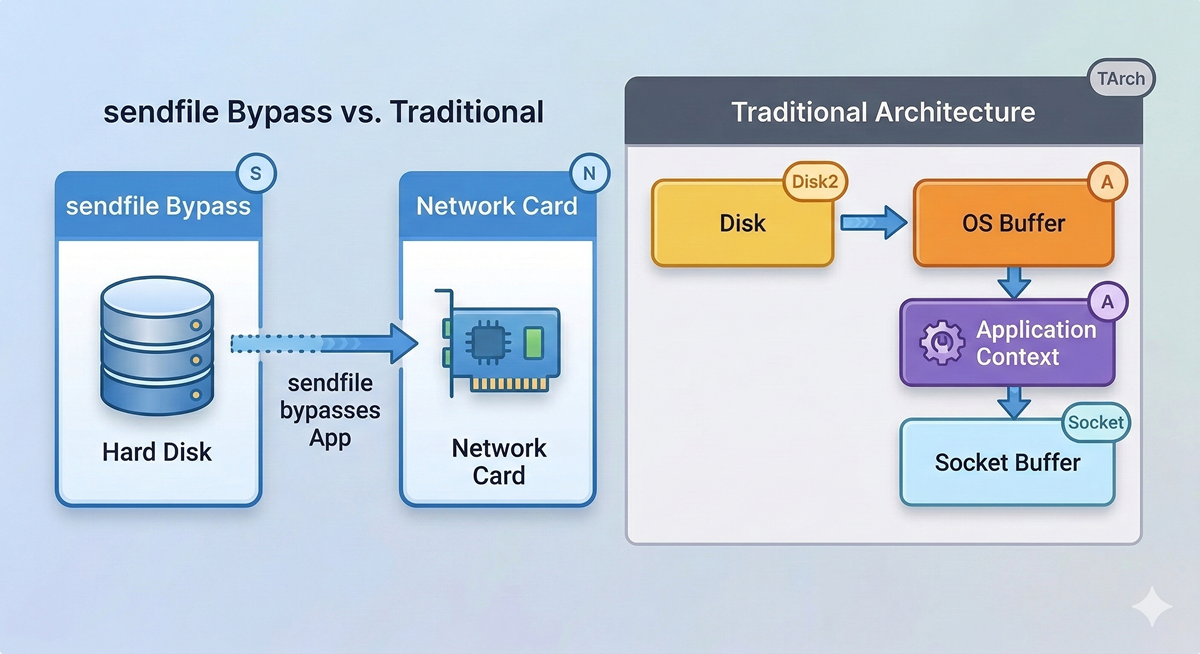
This instructs the OS to take the data directly from the Page Cache and shovel it straight into the Network Card. Kafka’s application code never even touches the payload. Because of this Zero-Copy principle, a Kafka broker uses almost zero CPU. Your processor sits idle while your network interfaces are red-lining, pumping terabytes of telemetry out the door.
Conclusion
Kafka doesn’t achieve its legendary performance through brute force. It achieves it through incredible mechanical sympathy with the Operating System, combined with a brilliantly simple, horizontally scalable distributed model.
By utilizing Brokers and Replicas, it survives disaster. By using Topics and Partitions, it scales infinitely. And by leveraging Offsets, it guarantees precision. So the next time you design a system that might send 500,000 text messages, leave the Thread.sleep() behind and let the events stream.
About Author